
Meta
2022 – PresentProduct Design Manager, Meta
Four years leading design through layoffs, AI mandates, and platform-scale enterprise problems. The pattern: the highest-leverage work was rarely visible in the product.
Side Work & Ventures · Meta
Never be late again with a MacOS menu bar app that keeps your next meeting front and center. No more buried calendar tabs, no more 'sorry I'm late' – just a persistent countdown and one-click join.

I was deep in a Figma file. A meeting started :05 past the hour. By the time I found the calendar tab, clicked into the event, and hunted for the Zoom link — I was already late. Again.
My calendar was set to notify me 10 minutes before meetings. The notifications never came through reliably. And even when they did, 10 minutes was too much lead time to actually change my behavior.
I stopped blaming discipline and started blaming tooling. The calendar app wasn't designed to keep you on time. It was designed to help you plan. Those are different jobs.
Next Up is a macOS menu bar app that keeps your next meeting permanently visible. A live countdown, always in your peripheral vision. Click it to see the full meeting card: title, time, attendee count, one-click Zoom/Meet join, and if there's an agenda doc attached to the invite, a direct link to it.
Priority classification was built in from the start — every meeting is automatically classified as Leading, Contributing, or Listening based on whether you organized it, attendee count, and title patterns. That classification determines notification timing: Leading meetings get a 5-minute heads up, everything else gets 2. Reliable, customized, actually fires.
Late detection was also in v1. If a meeting has started and you haven't joined, the menu bar shows -Xm. Open the card and it pulses with a "Join now" button. I quickly found myself developing a new habit — glancing at the menu bar counter became automatic, the same way you check a clock.
Smart filtering rounded out the original build: personal blocks like Break, Lunch, and Focus Time excluded from notifications entirely. Declined meetings hidden.
Using it in the office revealed two gaps.
First: conference rooms. Meetings booked in a room needed to send the call to the room device, not just open a link. I added a Room button that routes to our internal join tool — the one that lets you join from any booked room. Getting it right took three iterations: the button had poor padding, text wrapped awkwardly, and the connection to the internal tool didn't work until the third pass.
Second: the "I'm in" button. Once rooms worked, a new edge case appeared — what if I walked into a physical room but the app still showed me as late? I needed a way to dismiss the late state without clicking a join link. One button, problem solved.
The last feature was the most specific to how I work. I have regular 1:1s with each of my direct reports, and we use a shared note-taking tool tied to each manager-report relationship. I added automatic detection so that when a 1:1 appeared in the countdown, it surfaced a direct link to that person's notes. Prep in context, one click, before the meeting starts.
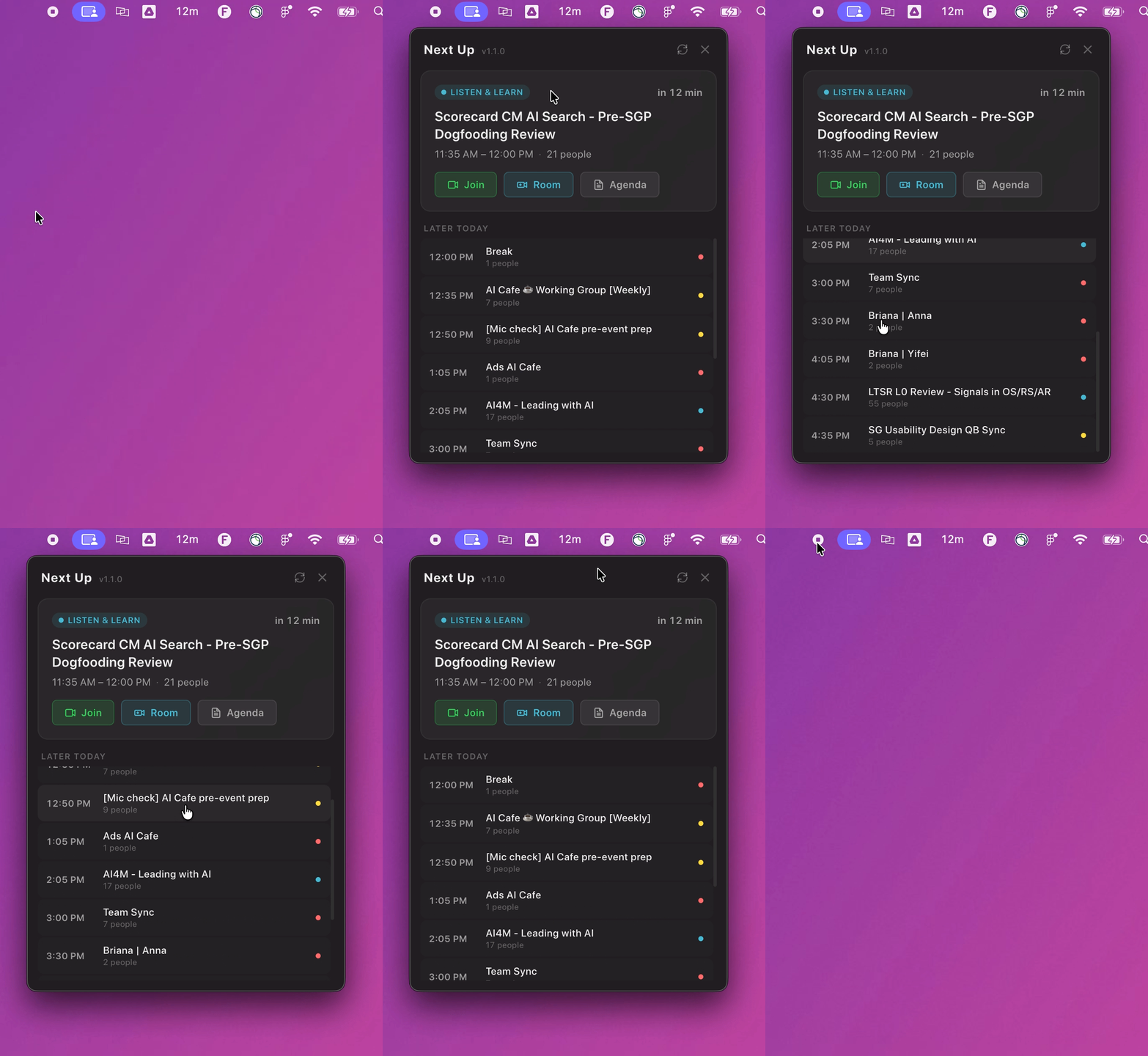
The entire app was built using Claude Code as a coding partner.
Because I was working within my existing second brain — which already understood my preferences, working style, and taste decisions like dark mode and simplicity — there was less back-and-forth than you might expect. The context was already there. Claude handled the scaffolding, parsing logic, and iteration. I drove the product decisions: what to show, when to notify, how to classify priority, what "late" actually means, and what each new edge case required.
That division of labor is the point. I'm not a developer. But I think in systems, I know what good UX feels like, and I can articulate problems precisely. It turns out that's most of what you need.
I posted it internally with no promotion. It reached ~19K people across internal groups; 5,800 saw it, and 293 clicked through to install. Reactions, comments, and shares stacked up across the original post and a Hack of the Week feature — plus a comment thread with Christopher Chedeau, co-creator of React.
It spread on its own. Someone remixed it and shipped a light mode version. Others started talking about baking it into an internal toolkit — making it accessible to all ~80,000 employees, not just people comfortable running it locally.
A Director of Engineering pinged me. He'd been using Next Up, wanted a filter for the auto-blocked time he puts on his own calendar, and asked how to land a change to the codebase.
I delivered a configurable build in seventeen minutes — three-step install, hard-won troubleshooting baked in, and a default solo-meeting filter plus a switch for title-pattern or attendee-threshold rules, so he could shape the filter to his own workflow without touching code.
His reply: "It works. Presumably now that I have a local setup, I can claude out the changes. But it's very nifty."
That's the whole point, wrapped in nine words. It wasn't about the feature. It was that a senior engineer treated a side project as a workbench worth extending.
I didn't set out to build a meeting app. I set out to stop being late. The app is just the artifact.


More Work
Meta
2022 – PresentFour years leading design through layoffs, AI mandates, and platform-scale enterprise problems. The pattern: the highest-leverage work was rarely visible in the product.

Meta
2023Three rounds of layoffs. Six months of uncertainty. A team who weren't allowed to talk about it in a group settings. This is how we came out the other side.

Macy's Inc
2021 – 2022Joined a team that grew 4 → 10 in a year. Led the digital rebrand across two flagship brands — and authored the career framework that made the team scalable as it grew.